
Stainless Steel Clamps
AVK® Stainless steel clamps are used in water reticulation, sewage and waste applications. The broad range consists of tapped offtakes, flanged offtakes, repair, HDPE and Sewer OB Junction clamps.
Technical Guide
Features & Benefits
Advantages
|
Features |
Benefits |
|
Manufacture from grade 316 Stainless Steel |
Superior corrosion protection. |
|
Nitrile rubber gaskets |
Provide a potable water contact approval seal and insulates against galvanic corrosion. |
|
Clamp design |
Permits the installation of a single clamp on a range of pipe diameters. |
|
Dry film anti-galling coating |
Minimise galling on the Stainless Steel fasteners. |
Applications
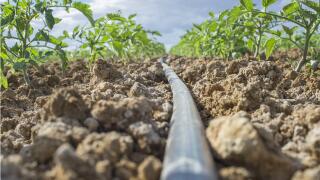
AVK® stainless steel clamps can be used in water reticulation, sewage, wastewater and irrigation pipelines, providing a fast, permanent repair and reinforcement solution for most pipe types and sizes.
- AVK® repair clamps provide a repair solution for most leaking, cracked or damaged pipe.
- Tapped off-take into old, unstable or damaged pipe where both tapping and reinforcement are a requirement.
- AVK® stainless steel flanged offtake clamps for 'T' connections onto new or existing pipe systems.
Product Details
Product dimensions
Download AVK® Flanged Clamps Selection Guide Charts, AVK® Clamps Tapped Selection Guide and Single Double Multiple Repair Clamps Selection Guides.
AVK Flanged Clamps Selection Guide Chart
AVK Single Double Multiple Repair Clamps Selection Guide Chart
Certifications & Approvals
Standards and approvals
AVK® Stainless Steel Couplings are manufactured to the Australian Product Standard under third-party accreditation Quality Management System conforming to ISO 9001.
- Fully conforming to AS/NZS 4181-2013 Stainless Steel Clamps for waterworks purposes
- StandardsMark License SMK 1785
Installation & Handling
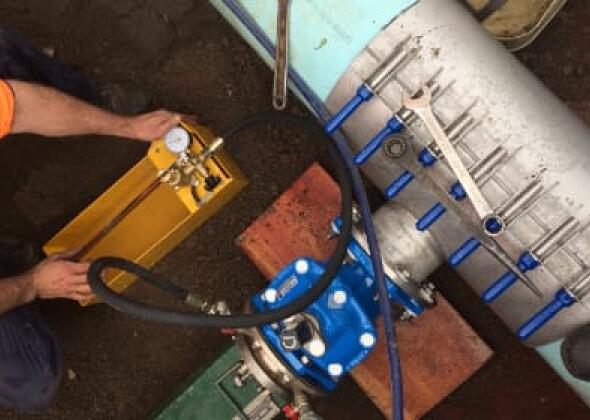
Installation and testing
Need help?
To speak with an Iplex sales & service team member
<!-- NOTE: Please add the following <META> element to your page <HEAD>. -->
<!-- If necessary, please modify the charset parameter to specify the -->
<!-- character set of your HTML page. -->
<!-- ---------------------------------------------------------------------- -->
<META HTTP-EQUIV="Content-type" CONTENT="text/html; charset=UTF-8">
<!-- ---------------------------------------------------------------------- -->
<!-- NOTE: Please add the following <FORM> element to your page. -->
<!-- ---------------------------------------------------------------------- -->
<form class="[ js-salesforce-form ]" action="https://webto.salesforce.com/servlet/servlet.WebToCase?encoding=UTF-8" method="POST">
<input type=hidden name='captcha_settings' value='{"keyname":"Toast","fallback":"true","orgId":"00D5i000009OHAY","ts":""}'>
<input type=hidden name="orgid" value="00D5i000009OHAY">
<input type=hidden name="retURL" value="http://">
<input type=hidden name="RecordTypeId" value="012N0000003OnNDIA0">
<input type=hidden name="subject" value="New Web Enquiry">
<input type=hidden name="Webform__c" value="Products">
<input type=hidden name="type" value="Product Enquiry">
<input type=hidden name="Origin" value="Web">
<input type=hidden name="Webform_Type__c" value="Metals">
<input type=hidden name="Webform_Sub_Type__c" value="Stainless Steel Clamps">
<input type=hidden name="Lead_Source_Web_Origin__c" value="">
<!-- ---------------------------------------------------------------------- -->
<!-- NOTE: These fields are optional debugging elements. Please uncomment -->
<!-- these lines if you wish to test in debug mode. -->
<input type="hidden" name="debug" value=1>
<input type="hidden" name="debugEmail"
value="[email protected]">
<!-- ---------------------------------------------------------------------- -->
<div class="salesforce-field half">
<label for="name"></label><input required id="name" maxlength="80" name="name" placeholder="First name" size="20" type="text" />
</div>
<div class="salesforce-field half">
<label for="name"</label><input required id="00N5i00000IoH6V" maxlength="255" name="00N5i00000IoH6V" placeholder="Last name" size="20" type="text" />
</div>
<div class="salesforce-field half">
<label for="email"></label><input required id="email" maxlength="80" name="email" placeholder="Email address" size="20" type="text" />
</div>
<div class="salesforce-field half">
<label for="phone"></label><input required id="phone" maxlength="40" name="phone" placeholder="Phone number" size="20" type="text" />
</div>
<div class="salesforce-field">
<label for="company"></label><input required id="company" maxlength="80" name="company" placeholder="Company" size="20" type="text" />
</div>
<div class="salesforce-field half">
<label></label><select id="00N5i00000IoH6N" name="00N5i00000IoH6N" title="Existing Customer">
<option value="" selected disabled>Are you an Iplex account holder?</option>
<option value="Yes">Yes</option>
<option value="No">No</option>
</select>
</div>
<div class="salesforce-field half">
<label></label><input id="00N5i00000IoH6M" maxlength="255" name="00N5i00000IoH6M" placeholder="Iplex account number" size="20" type="text" />
</div>
<div class="salesforce-field half">
<label></label><select required id="00N5i00000IoH6U" name="00N5i00000IoH6U" title="State">
<option value="" selected disabled>Select your state</option>
<option value="Australian Capital Territory">Australian Capital Territory</option>
<option value="New South Wales">New South Wales</option>
<option value="Northern Territory">Northern Territory</option>
<option value="Queensland">Queensland</option>
<option value="South Australia">South Australia</option>
<option value="Victoria">Victoria</option>
<option value="Western Australia">Western Australia</option>
<option value="Tasmania">Tasmania</option>
</select>
</div>
<div class="salesforce-field half">
<label></label><select required id="00N5i00000IoH6Q" name="00N5i00000IoH6Q" title="Market">
<option value="" selected disabled>Select your market</option>
<option value="Electrical">Electrical</option>
<option value="Plumbing">Plumbing</option>
<option value="Irrigation">Irrigation</option>
<option value="Civil, Mining and Telco">Civil, Mining and Telco</option>
<option value="Gas">Gas</option>
</select>
</div>
<div class="salesforce-field">
<label for="description"></label><textarea name="description" placeholder="Type your message here"></textarea>
</div>
<div class="g-recaptcha" data-sitekey="6Lfmy90UAAAAAKAyCxbgVN6SShPhRGT0W1RxDUwT"></div><div class="js-salesforce-form-message"></div> <input type="submit" name="submit">
</form>
<script>
function joinSelection(sourceSelector, destinationId) {
var sources = document.querySelectorAll(sourceSelector);
var values = [];
sources.forEach(function (source) {
if (source.checked) {
values.push(source.value);
}
});
document.getElementById(destinationId).value = values.join(', ');
}
</script>
<script src="https://www.google.com/recaptcha/api.js"></script>