


Milnes®
The Milnes® brand name has been in the industry for over 50 years, servicing the irrigation and plumbing markets.
Technical Guide
Features & Benefits
Applications
The Milnes® range of products are used for water supply consisting of:
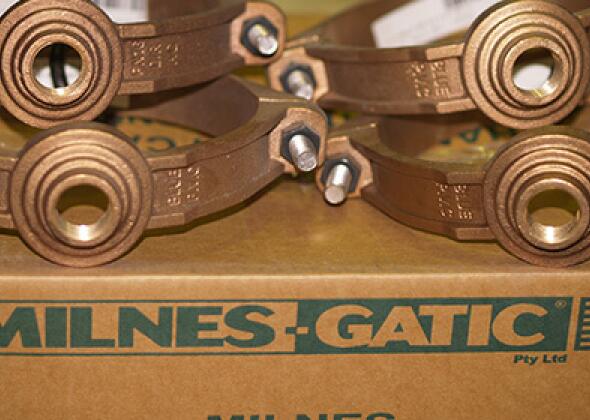
- Tapping bands – tapping a water main already under pressure allows services to be connected later without interrupting existing consumers or water services
- Inline and right-angle ball valves
- Standard and under pressure tapping ferrules
- Ferrule bends
Product Details
Material
The Milnes® product range is made from Gunmetal or Brass. Gunmetal is shiny alkaline brass, which is composed of copper and tin. Gunmetal is resistant to corrosion from steam and salt water, and is thus suitable for valves, pump parts and steam fittings.
Operating Pressures
|
Class of Product (PN) |
Allowable Operating Pressure - kPa |
Maximun Allowable Operating Pressure - kPa |
Allowable Site Test Pressure |
|
16 |
1600 |
1920 |
2000 |
Definitions:
Allowable operating pressure
The allowable internal pressure, excluding surge that a component can safetly withstand in service.
Maximum allowable operating pressure
The maximum internal pressure, including surge that a component can safetly withstand in service.
Allowable site test pressure
Maximum pressure applied on site in a newly installed pipeline, includes a safetly factor and allowances for surge.
Certifications & Approvals
Standards and approvals
The Milne®’s range conforms to the following Standards and Approvals:
- Tapping Bands - AS4793 / MP52 SPAC025
- Ferrule Bends – AS3688
- Pressure Tapping Ferrules and Standard Ferrules – AS3496 / AS3718
- Inline and Right Angle Ball Valves – AS4796 / MP52 SPEC012
Installation & Handling
Need help?
To speak with an Iplex sales & service team member
<!-- NOTE: Please add the following <META> element to your page <HEAD>. -->
<!-- If necessary, please modify the charset parameter to specify the -->
<!-- character set of your HTML page. -->
<!-- ---------------------------------------------------------------------- -->
<META HTTP-EQUIV="Content-type" CONTENT="text/html; charset=UTF-8">
<!-- ---------------------------------------------------------------------- -->
<!-- NOTE: Please add the following <FORM> element to your page. -->
<!-- ---------------------------------------------------------------------- -->
<form class="[ js-salesforce-form ]" action="https://webto.salesforce.com/servlet/servlet.WebToCase?encoding=UTF-8" method="POST">
<input type=hidden name='captcha_settings' value='{"keyname":"Toast","fallback":"true","orgId":"00D5i000009OHAY","ts":""}'>
<input type=hidden name="orgid" value="00D5i000009OHAY">
<input type=hidden name="retURL" value="http://">
<input type=hidden name="RecordTypeId" value="012N0000003OnNDIA0">
<input type=hidden name="subject" value="New Web Enquiry">
<input type=hidden name="Webform__c" value="Products">
<input type=hidden name="type" value="Product Enquiry">
<input type=hidden name="Origin" value="Web">
<input type=hidden name="Webform_Type__c" value="Metals">
<input type=hidden name="Webform_Sub_Type__c" value="Milnes">
<input type=hidden name="Lead_Source_Web_Origin__c" value="">
<!-- ---------------------------------------------------------------------- -->
<!-- NOTE: These fields are optional debugging elements. Please uncomment -->
<!-- these lines if you wish to test in debug mode. -->
<input type="hidden" name="debug" value=1>
<input type="hidden" name="debugEmail"
value="[email protected]">
<!-- ---------------------------------------------------------------------- -->
<div class="salesforce-field half">
<label for="name"></label><input required id="name" maxlength="80" name="name" placeholder="First name" size="20" type="text" />
</div>
<div class="salesforce-field half">
<label for="name"</label><input required id="00N5i00000IoH6V" maxlength="255" name="00N5i00000IoH6V" placeholder="Last name" size="20" type="text" />
</div>
<div class="salesforce-field half">
<label for="email"></label><input required id="email" maxlength="80" name="email" placeholder="Email address" size="20" type="text" />
</div>
<div class="salesforce-field half">
<label for="phone"></label><input required id="phone" maxlength="40" name="phone" placeholder="Phone number" size="20" type="text" />
</div>
<div class="salesforce-field">
<label for="company"></label><input required id="company" maxlength="80" name="company" placeholder="Company" size="20" type="text" />
</div>
<div class="salesforce-field half">
<label></label><select id="00N5i00000IoH6N" name="00N5i00000IoH6N" title="Existing Customer">
<option value="" selected disabled>Are you an Iplex account holder?</option>
<option value="Yes">Yes</option>
<option value="No">No</option>
</select>
</div>
<div class="salesforce-field half">
<label></label><input id="00N5i00000IoH6M" maxlength="255" name="00N5i00000IoH6M" placeholder="Iplex account number" size="20" type="text" />
</div>
<div class="salesforce-field half">
<label></label><select required id="00N5i00000IoH6U" name="00N5i00000IoH6U" title="State">
<option value="" selected disabled>Select your state</option>
<option value="Australian Capital Territory">Australian Capital Territory</option>
<option value="New South Wales">New South Wales</option>
<option value="Northern Territory">Northern Territory</option>
<option value="Queensland">Queensland</option>
<option value="South Australia">South Australia</option>
<option value="Victoria">Victoria</option>
<option value="Western Australia">Western Australia</option>
<option value="Tasmania">Tasmania</option>
</select>
</div>
<div class="salesforce-field half">
<label></label><select required id="00N5i00000IoH6Q" name="00N5i00000IoH6Q" title="Market">
<option value="" selected disabled>Select your market</option>
<option value="Electrical">Electrical</option>
<option value="Plumbing">Plumbing</option>
<option value="Irrigation">Irrigation</option>
<option value="Civil, Mining and Telco">Civil, Mining and Telco</option>
<option value="Gas">Gas</option>
</select>
</div>
<div class="salesforce-field">
<label for="description"></label><textarea name="description" placeholder="Type your message here"></textarea>
</div>
<div class="g-recaptcha" data-sitekey="6Lfmy90UAAAAAKAyCxbgVN6SShPhRGT0W1RxDUwT"></div><div class="js-salesforce-form-message"></div> <input type="submit" name="submit">
</form>
<script>
function joinSelection(sourceSelector, destinationId) {
var sources = document.querySelectorAll(sourceSelector);
var values = [];
sources.forEach(function (source) {
if (source.checked) {
values.push(source.value);
}
});
document.getElementById(destinationId).value = values.join(', ');
}
</script>
<script src="https://www.google.com/recaptcha/api.js"></script>